Best way to install ffmpeg for yt-dlp 2026
ffmpeg is a versatile command line program. It converts videos from one format to another, extracts audio from video, creates videos from static images and audio files and so much more.
If you are going to use yt-dlp, you must have ffmpeg installed on your computer. How to add ffmpeg to path windows?
If yt-dlp complains that ffmpeg is not installed, this is how to install ffmpeg to PATH.
Download ffmpeg
Visit the FFMpeg Windows Builds page.
From the Assets section, choose master-latest.
Make sure it’s for your windows version (mine’s win64).

Click on it, wait for it to download.
And then…
Extract ffmpeg archive to a separate folder
Where to put ffmpeg once you’ve downloaded it?
I like to put my ffmpeg folder under C:\Z
But you can put it anywhere else on your drive.
Make sure you remember where, though.
Remember the full path, we’ll need it below.

Set ffmpeg PATH for yt-dlp
You need to add ffmpeg to the PATH environment variable on Windows.
Press Start, the write path. This shows up (on Windows 10):

Press on Edit the system environment variables. The System Properties dialog shows up:

Now press on Environment Variables. The Environment Variables form shows up next:

Under User variables for [Your User Name], double click on Path.
Select the line starting with Path and press Edit.
Alternatively, you can double click the Path line.
The Edit environment variable form shows up.

Press New on the Edit environment form.
A blank line will be added, and you will edit it.
Enter the full path to ffmpeg there – C:\Z\ffmpeg-master-latest-win64-gpl\bin
Make sure ffmpeg.exe exists in that folder you’re adding.
Press OK and close all remaining forms.
Having region-blocked videos or issues like HTTP 403 errors?
Some platforms restrict access based on IP location or apply aggressive rate-limits.
If you also want to stay secure online, using a VPN often resolves the issue immediately.
I suggest using NordVPN to bypass these limitations.
Clicking on the banner below will give you a special discount (up to 70% off).

NordVPN works reliably with yt-dlp, offers fast servers in many regions, and doesn’t interfere with command-line tools.
Testing that ffmpeg works from the CMD line
Let’s make sure ffmpeg.exe is picked up by the command line.
Open a new command line
- Press Start
- Type cmd
- Press Enter
A new command line should open.
Enter ffmpeg -version in there.
It should display something like this:

Yes, ugly output.
But it means ffmpeg is now available to all programs and scripts on your computer, for your current user.
This also means yt-dlp can use ffmpeg.
How to use yt-dlp?
Well, after you have yt-dlp, do not double click the executable.
You must use it from the command line, like this:
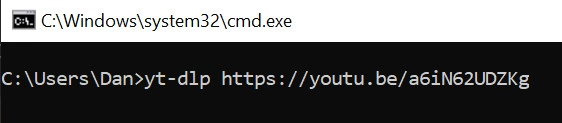
Open the command line (press Start, write cmd).
Then write yt-dlp youtube-link
Replace youtube-link with an actual link to a youtube video you want to download.
For your information, yt-dlp can download from other sites, not just YouTube.
You can also give it the link to a YouTube playlist, not just a single video.
