There are multiple ways to get audio from video and we will go through them one by one.
For now, three methods are provided in this article (more to come):
- How to get audio from video with ffmpeg?
- How do I extract audio from video with Adobe Audition?
- How to extract audio from video with Premiere Pro
How do i extract audio from a video with ffmpeg?
This option is a bit tech-savvy and it depends on ffmpeg.
Ffmpeg is a versatile (and free) video and audio conversion tool for the command line.
If you don’t have it installed, check How to install ffmpeg article.
Alright, ready to get your audio from that mp4 video file?
Watch the video or follow the steps below, your choice.
Let’s say you want to extract audio from the video file SRS.mp4.
You’ve put SRS.mp4 in your Downloads folder.
How do you extract audio from that mp4 file?
Press Start and write cmd, then press Enter.
The command line opens up.
Now write cd Downloads\Extract, press Enter.
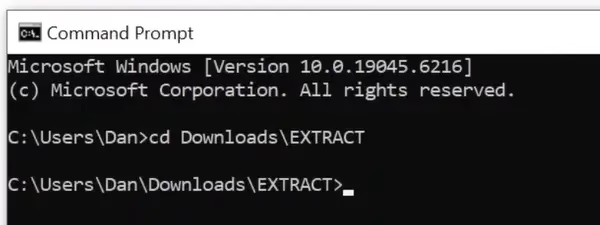
This changes the current directory to the one containing the file.
Now run the command
ffmpeg -i srs.mp4 srs.mp3

Press Enter, wait a few seconds and that’s it!
The folder Downloads\EXTRACT should now contain the srs.mp3 file with the audio track from the video.
On Windows, the command is case insensitive, it doesn’t care if your file name is SRS.mp4 or srs.mp4.
You have now extracted audio from an mp4 file!
Let’s recap the syntax of the command:
ffmpeg -i VIDEO.mp4 AUDIO.mp3
Notice the “-i” argument, which is required.
VIDEO can be in formats other than mp4 but it has to be supported by ffmpeg.
You can also convert to any other audio formats supported by ffmpeg, like .WAV.
But if you don’t like this tech-savvy solution, maybe you can try one of the alternatives.
How to extract audio from video with Adobe Audition
Here is how you can use Adobe Audition to extract audio from video.
How to extract audio from video with Premiere Pro
Here is how you can use Premiere Pro to extract audio from video.
Know of other ways to extract that audio from your mp4 file?
Drop a comment below
